Wednesday, December 23, 2020

Remove Juul Account

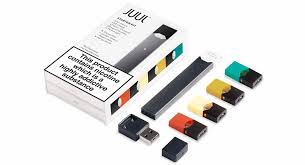
 Juul is an online e-commerce website that is currently selling e-cigarettes and vape. The online website provides an option to create or edit account information, knowledge about the products, option to choose between different kinds of products and community portal where you can share information, problem and experience related to the e-cigarettes. 

How To Remove Juul Account

Currently, there is only one way to delete your account from the Juul website which is given below:-

Remove Your Account through E-mail

  1. Open your email account that is registered with the website.
  2. Now compose an email and enter the email address legal@juul.com
  3. On Subject Type “REQUEST TO REMOVE MY ACCOUNT”.
  4. Now write an email regarding deleting your account sample given here and write your honest reason regarding deleting your account.

Remove J Crew account

 J Crew is an online e-commerce and retail web portal that let its registered users to buy and sell clothes and accessories. The online website provides an option to create or edit account information, browse or search through the list of products, upload pictures, add description and detail related to the products and purchase the product using various payment methods. 

How To Remove J Crew Account

Currently, there is only one way to delete your account from the J Crew website which is given below:-

Remove Your Account through E-mail

  1. Open your email account that is registered with the website.
  2. Now compose an email and enter the email address GDPR@jcrew.com (in EEA) and privacy@jcrew.com (Outside EEA, Including US)
  3. On Subject Type “REQUEST TO REMOVE MY ACCOUNT”.
  4. Now write an email regarding deleting your account sample given here and write your honest reason regarding deleting your account.

Remove L’OCCITANE Account

 L'Occitane en Provence, commonly known as L'Occitane, is an international retailer of body, face, fragrances and home products based in Manosque, France. The company was founded in 1976 by Olivier Baussan with the purpose to create a company that celebrates and preserves the traditions of his native Provence.

How To Remove L’OCCITANE Account

Currently, there is only one way to delete your account from the L’OCCITANE website which is given below:-

Remove Your Account through Website Contact

  1. Visit the OFFICIAL L’OCCITANE Website “https://www.loccitane.com/”.
  2. Now select the country where you reside in.
  3. Once selected you will be redirected to the homepage. Now scroll down and click on the link Contact Us giving at the bottom of the page.
  4. On the Contact Us page, you will find a form and an email address. We will use the form method to fill out the required detail in forms such as name, tel, city and email address.
  5. On the comment section state your honest reason to delete your account, agree to the terms and hit on Submit Button. Now, wait for the company representative to respond to the sent form on your email address.

Tuesday, December 22, 2020

Remove C’Me Account


C’ME is an online social media application that let it’s registered to communicate with each other through chat and call. You don’t need to fill out such heavy forms in order to create an account on the application, only some specific information is necessary such as your phone number.

How To Remove C’ME Account

Currently, there is only one way to delete your account from the C’ME website which is given below:-

Remove Your Account through Email Address

  1. Open your email account that is registered with the website.
  2. Now compose an email and enter the email address cme@technologiaworld.com
  3. On Subject Type “REQUEST TO REMOVE MY ACCOUNT”.
  4. Now write an email regarding deleting your account sample given here and write your honest reason regarding deleting your account.

Remove ExpressVPN Account

ExpressVPN is an online virtual private network for computers and phone that securely and anonymously connect your device on the websites. The online website allows users to create or edit account information, choose a plan of your choice, pay for the software using various payment methods and connect your device on the internet to browse the web anonymously. 


How To Remove ExpressVPN Account

Currently, there is only one way to delete your account from the ExpressVPN website which is given below:-

Remove Your Account through Email Address

  1. Open your email account that is registered with the website.
  2. Now compose an email and enter the email address support@expressvpn.com
  3. On Subject Type “REQUEST TO REMOVE MY ACCOUNT”.
  4. Now write an email regarding canceling your account sample given here and write your honest reason regarding deleting your account.

Remove Knights Chronicle Account

Knights Chronicle is a fantasy based Android and iOS game in which you have to go through an adventurous journey and battle with monsters strategically. The android game and website allows its users to create or edit account information, play the game with your friends using multiplayer mode, go through the adventurous storyline and purchase items related to the game by browsing the in-game store.

How To Remove Knights Chronicle Account

Currently, there is only one way to delete your account from the Knights Chronicle game which is given below:-

Remove Your Account through Email Address

  1. Open your email account that is registered with the website.
  2. Now compose an email and enter the email address netmarbles@igsinc.co.kr
  3. On Subject Type “REQUEST TO REMOVE MY KNIGHTS CHRONICLE ACCOUNT”.
  4. Now write an email regarding canceling your account sample given here and write your honest reason regarding deleting your account.

Remove Keepsafe Account


 Keepsafe is a Security Application for Android and iOS phones that locks users personal Pictures and Videos with different kinds of lock such as Fingerprint, Pattern, and Number based Lock. The online application allows its users to create or edit account information, browse through a list of locks, select the files and folders from your internal storage or SD Card and secure them with different locks. 

How To Remove Keepsafe Account

Currently, there is only one way to delete your account from Keepsafe app which is given below:-

Remove Your Account through Email Address

  1. Open your email account that is registered with the website.
  2. Now compose an email and enter the email address support@getkeepsafe.com
  3. On Subject Type “REQUEST TO DELETE MY ACCOUNT”.
  4. Now write an email regarding canceling your account sample given here and write your honest reason regarding deleting your account.