Showing posts with label Remove Instagram. Show all posts

Tuesday, May 10, 2022

How To Remove Blingee Account


Blingee is a online web portal where user can create or send animated pictures. The registered users can edit or change profile information, add glitters to picture and comment on pictures. 

How To Remove Blingee Account

There are two methods to delete your account from Blingee website which are given below :-.

Remove Your Account Through Website

  1. Go to following url “http://blingee.com/account/request_deletion” and login to your account.
  2. Once you login to your account you will be redirected to account deletion page.
  3. On account deletion page enter your password and click on button SUBMIT.
  4. Once you click on submit an email has been send to your mail account.
  5. Open your email account and go through the link mentioned in the mail you received from blingee.
  6. Now you will be redirected to confirm delete account page here click on button YES, REMOVE MY ACCOUNT to permanently delete your account.

Remove Your Account By Sending Email
  1. Open your registered email account and compose a new mail.
  2. Enter the following email address support@blingee.com
  3. On Subject enter the line “REQUEST TO REMOVE MY ACCOUNT”.
  4. Now write a mail to delete your account sample given here and click send.

 

Wednesday, June 23, 2021

Remove Geneanet Account


Geneanet is an online web portal that collects your genealogical information for free and let you find your ancestors based on the collected information. The website provides an option to create or edit account information, start your family tree, search for your known one’s information on the website and post your query related to the service on the website community forum.

Geneanet services were launched in 1996 and currently, it is one of the best online websites to find your ancestors information that can be accessed worldwide. As per source currently, there are more than 3 million users submitted their genealogical information on the website.

How to Remove Geneanet Account

Currently, there is only one way to delete your account from the website which is given below:-

Remove your Account through Website

  1. First, go through the following URL “https://en.geneanet.org/connexion/” and sign-in to your account.
  2. Once you sign-in to your account then click on your USERNAME which is given at the top right side of the page.
  3. Once you click on USERNAME a drop-down menu section will appear on that section click on PROFILE link.
  4. Now scroll down to bottom of the page and click on Delete Account Link.


Tuesday, March 16, 2021

Remove MuseScore Account


MuseScore is an open source software for music notation and compositor that let it’s users to create music score. The website provides an option to create or edit account information, download the software on your computer, create a music score from template or scratch, add, edit or delete the music notation in your score and save the file in a different format or print the score you have made.

How To Remove MuseScore Account

Currently, there is only one way to delete your account from Musescore Website which is given below:-

  1. Go To “https://musescore.org/” website and log-in to your account.
  2. Once you log-in to your account click on your USERNAME which is given at the top right side of the page.
  3. In Username Drop-Down Menu list click on the link SETTINGS.
  4. In the Left Column of the settings page click on the link “CANCEL ACCOUNT” given at the bottom side of the section.

Friday, November 13, 2020

Remove Aisle Account


Aisle is an online dating app for Indians that allows its registered users to connect and communicate with each other which may or may not turn into a healthy relationship. The online application allows its users to create or edit account information, upload pictures, browse or search through the list of profiles, check profile and information of the person that you will found interesting and connect or bookmark the person to chat with that person.

How To Remove Aisle Account

Currently, there is only one way to delete your account from Aisle application which is given below

Remove Your Account by Sending Email

  1. Open your email account that is registered with the application.
  2. Now compose an email and enter the email address team@aisle.co
  3. On Subject Type “REQUEST TO DELETE MY ACCOUNT”.
  4. Now write an email regarding canceling your account sample given here and write your honest reason regarding deleting your account.

Saturday, February 6, 2016

Remove Twitter Account permanently

How to remove twitter account

 Image result for How to remove twitter account
That’s it. You’ve given Twitter a shot, and you’ve decided it’s not for you. Everyone’s mean. Hashtags are dumb. Algorithmic timelines. It makes no sense. Whatever the reason, it’s time to delete your account. How do you go about deleting your Twitter account? It’s easy. Just follow the steps below.

1. Head to a computer

For some reason, you can’t deactivate your account using a mobile device. So if you’re on a mobile device now, find a computer.
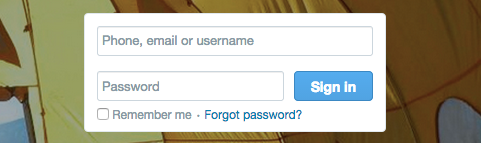
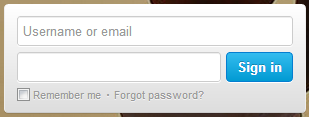
twitter-login

2. Log into your account

Type in your username and password.
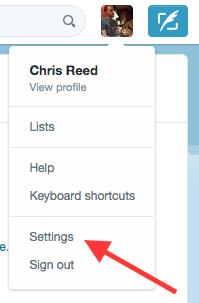
twitter-settings

3. Go to “Settings”

To find this, click your profile picture in the upper right corner of the screen. You’ll see “settings” in the dropdown menu that appears.
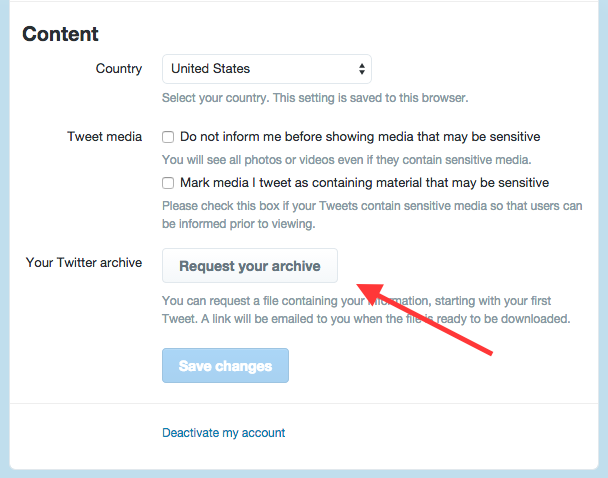
twitter-request-archive

4. Request your archive (optional)

This is an optional step you can use if you want to save a copy of your tweets.
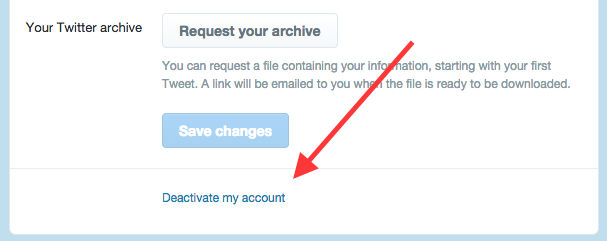
twitter-deactivate-account

5. Click “Deactivate my account”

Fittingly, it’s the last option in the list.
twitter-deactivate-information

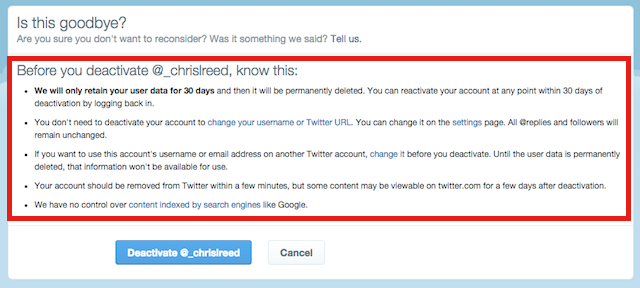
6. Read the information

A page will appear that tells you information about what happens when you deactivate your account.
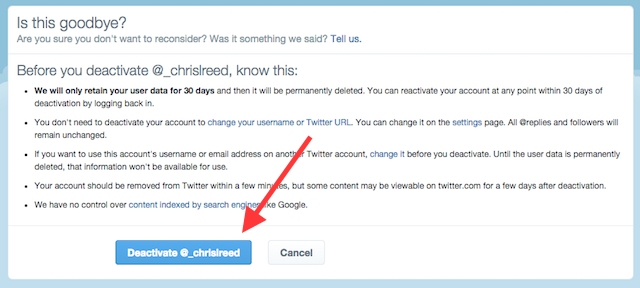
twitter-deactivate

7. Click “Deactivate”

It’s the big blue button at the bottom.
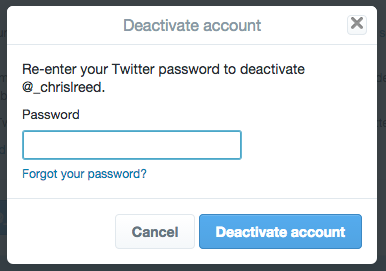
twitter-deactivate-password

8. Enter your password

To verify that it’s really you, and you really want to do this, type in your password.

9. That’s it!

Your account will disappear from the site within a few minutes. However, Twitter will hold onto your user information for 30 days. During that time, if you change your mind about leaving Twitter, you can get your account back simply by logging in. After 30 days have elapsed, your account is officially gone for good.


Follow the following few illustrations on how to delete your twitter account.
Step 1:
LOGIN TO THE ACCOUNT YOU WANT TO REMOVE
Delete Twitter Account
LOGIN TO TWITTER ACCOUNT
Step 2:
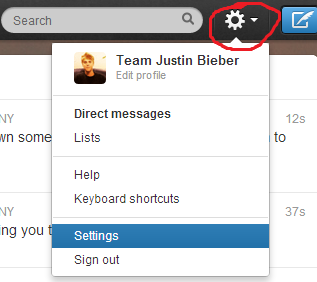
CLICK THE SETTINGS
Click the “engine” icon on the top-right corner of your twitter home page. Then in the drop down menu, click Settings
Delete Twitter Account
Step 3:
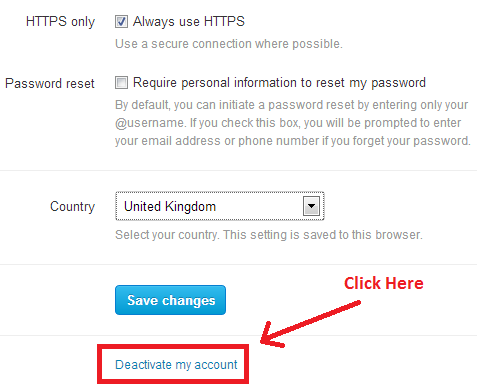
DEACTIVATING YOUR ACCOUNT
In the settings page, scroll up to the bottom of your page, then you will see Deactivate My Account Click that link.
Delete Twitter Account
Step 4:
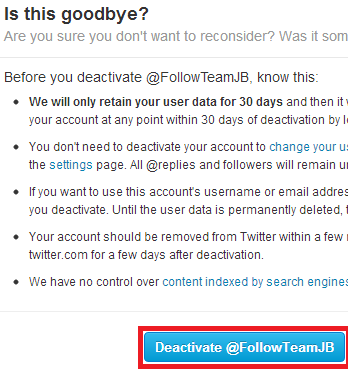
VERIFY YOUR ACTION
  • After clicking deactivate my account, you will be required to verify your action,
  • Make sure to carefully read all of the details about deleting your account.
  • It can take up to 30 days for a deactivate profile to clear from Twitter’s internal systems.
  • During the time that it takes to remove your account from Twitter, you won’t be able to create any new accounts using the same username or email addresses.
  • You can restore your account by signing back in within 30 days after deleting it.
  • After 30 days, your account will be completely deleted and inaccessible.

Delete Twitter Account
Upon committing Deactivate@YOURACCOUNT, your account will be deleted basing on the conditions I mentioned above.

Tuesday, February 2, 2016

Remove Instagram Account

How to Remove Instagram Account

 Image result for How to Delete Instagram Account

If you want to delete your Instagram account, follow the following steps to achieve this:
Delete Instagram Account
  • Sign in to your Instagram account by entering your username and password and click Log in button.
  • Locate your username on the top right-hand corner of your browser, and click.
  • From the drop down links, click “Edit Profile
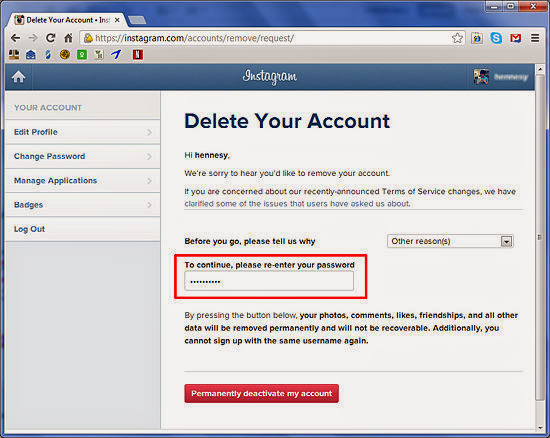
  • Locate the link on the page towards the bottom right edge of the settings area, that states “I’d like to delete my account“. Click the link.
  • Locate and click the drop-down box for the reason why you’d like to delete the account.
  • Click the reason you want, to select your reason. Most people select “Other“, but if a better reason is already listed, click that link instead.
  • Click into the “To continue, please re-enter your password” box then enter your account password.
  • Click the box stating “Permanently delete my account“.
Directly, just click this link and delete your account  for good:

How to Remove followgram account

How to remove  followgram account

 Image result for How to remove  followgram account
Looking for how to delete followgram account? Followgram.me is the web interface to enjoy your Instagram photos on the web.
To delete your followgram.me account, just follow the following:
1. Login to your followgram.me account using your web browser.
2. After login, go to settings page.
3. In settings page, scroll down you will see the link to remove your account.

Remove Followgram

Then you will be asked to confirm if you are sure you want to remove your account, just click Ok.
The direct link to remove FollowGram is: